


The web CMS is finally with us and bedding in nicely! We now have what we dreamt of nearly 15 years ago.
Thank you all for your feedback over the past few months it has been very helpful!
It’s fair to say that there have been a few bumpy releases along the way, and for that we apologise. Thank you for your patience, persistence, and for continuing to provide feedback.
We’re about to release the latest version of the CMS which addresses several flaws from our initial copy of Shopfront Designer that some of you may have had trouble with.
This update includes:
1. View switcher
The old tile display is great, but old, and not best suited when you have over 100 products in one department!
Using a new button at the top of the department view, you can switch between tiles and list. Your preference will be remembered.


2. Moving Products
This is the item we have had the most reports about! It was not obvious in the initial implementation that there were two drag & drag hot spots on the tiles.
- You will now find that if you grab an item using the little list icon button, you can move it to other departments:

- If you grab an item by the arrow icon, you can reorder it in the department it sits in (e.g., move something to top/bottom)

- We’ve added some visual indicators too while dragging:

3. Cluttered right-hand side
We found that the right-hand side of the CMS had become cluttered, and over the years it became a dumping ground for “everything else” that didn’t belong in the main view of Shopfront Designer.
This area is now far cleaner and only contains the core search/import tools needed for the core CMS function:

4. Branding and other functions
Following on from point #3, we needed access to those other functions, so we have created a hover pop-out menu on the left-hand side and added them alongside the CMS and Shipping.
The new menu has been matched to the GOb2b branding, as has the rest of the CMS. You’ll see a lot more of the GOb2b green, and a lot more consistency in terms of button/text sizing, colours, icons, menus etc giving us a coherent approach to all of the features added to the site.

The overhead view now looks like this:
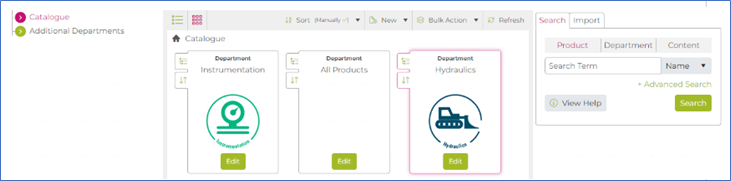
So, what’s next?
We still have a large number of things we want to improve and tweak so make the CMS as easy as possible.
The next release will include:
- More UI & UX improvements to brands, feature sets, promotions, feeds, and shipping.
- Improved touch screen support – we know several customers are using iPads & Surface Pros.
- Small screen support (responsive) – on occasion you might need to make a small change in a hurry – doing this from a mobile phone would be beneficial.
- Comprehensive series of bitesize training videos, to be used predominantly by our onboarding team, but they will also to useful to highlight the changes we have or might make that differ from the old Shopfront Designer.
- Making the product import tab as performant as possible (notably Sage 50)
- The migration of the existing website Admin section functions into the new application.
- And more!
We are still thinking about:
- How we can make matrix product creation/maintenance as easy as possible.
- Duplication and bulk edit functionality to speed up certain workflows.
Please continue to provide your feedback so we can make the CMS as great as possible for everyone!
